|
|
 06-15-2010, 02:12 PM |
#1 | |||
|
Admiring the nostalgic touches on Buena Vista Avenue

Join Date: May 2010
Location: Wellington, New Zealand
Software: GIMP
Camera: Canon EOS D40
Posts: 648
|
Text Along Path - GIMP
Hi there, I recall seeing a request for a tut on how to create text along path.
The following will be for GIMP users, my software of choice.  Hopefully others will add the equivalent for other software here. Lets start... 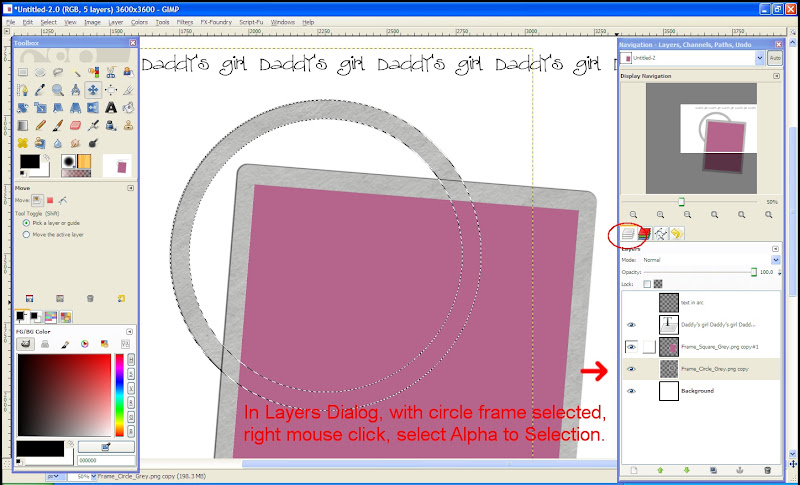 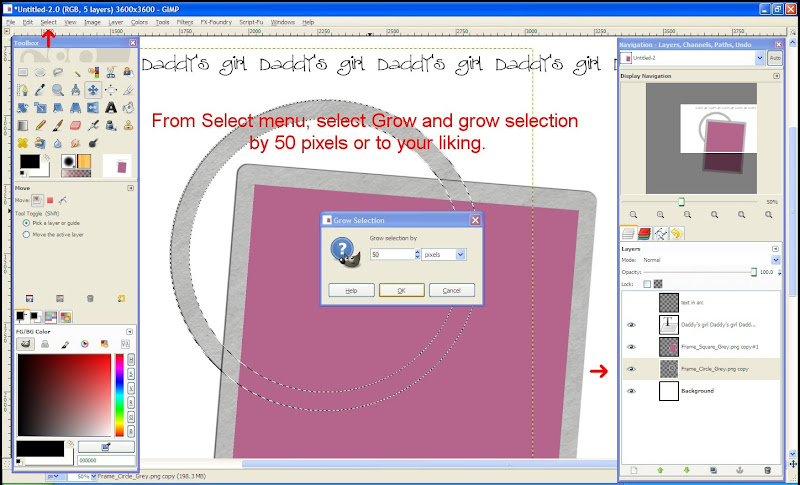  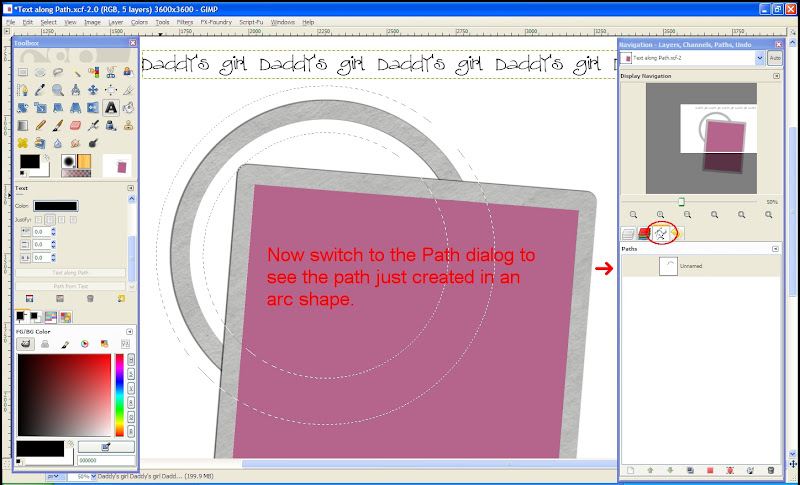  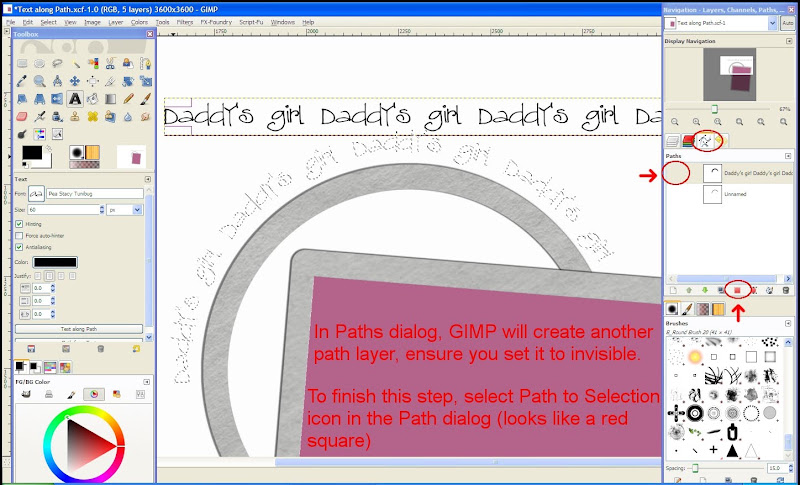 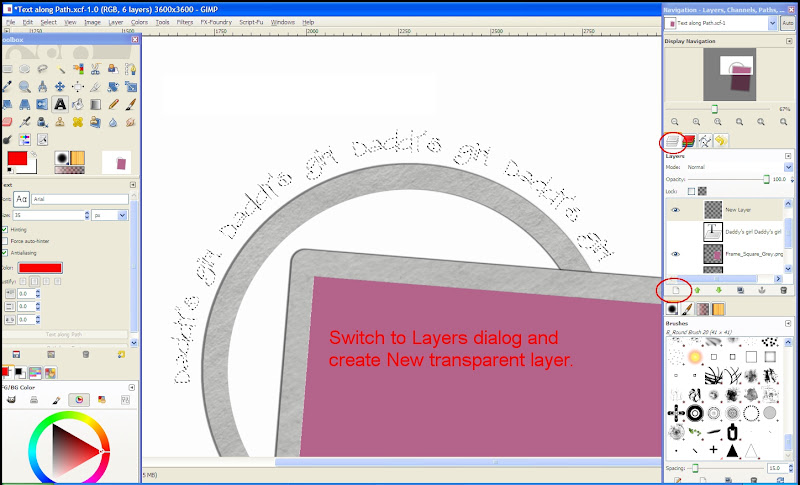 


Last edited by buttner-jenkins; 06-15-2010 at 02:19 PM. 
|
|||

|

|
|||
| Sponsored Links |
|
06-15-2010, 06:24 PM
|
#2 | |||
|
Administrator
 
Join Date: Mar 2009
Location: So Cal
Software: PSE 7
Camera: Nikon D50
Posts: 5,531
|
Wow, Mo, this is wonderful!
 I don't have GIMP but your directions are so clear and the screenshots really help a lot. The text along the curve looks awesome. I am wondering if PSE has similar tools - I want to be able to do something like this! Thanks so much for taking the time to write this up! 
__________________
Travel agent specializing in Disney Destinations Magical Vacations, LLC  Studio1955 


|
|||
|
|
|
|||
|
06-24-2010, 11:05 AM
|
#3 | ||||
|
Fascinated by the World of Color

Join Date: Sep 2009
Location: So. California
Software: CS5 and PSE8
Camera: Sony NEX-5R & QX-100
Posts: 800
|
Quote:
So if anyone could do a tutorial on how to make the text paths in Photoshop, that would be awesome! 


|
||||
|
|
|
||||
|
06-24-2010, 01:28 PM
|
#4 | ||||
|
Admiring the nostalgic touches on Buena Vista Avenue
Join Date: May 2010
Location: Wellington, New Zealand
Software: GIMP
Camera: Canon EOS D40
Posts: 648
|
Quote:
 as I was looking forward seeing your tutorial equivalent along mine   Just thought of something for all you PSE users, download GIMP for free to create your own text path wording and use in your PSE layouts as a png layer. A small saving of a few dollars |
||||
|
|
|
||||
|
06-24-2010, 07:59 PM
|
#5 | |||
|
Fascinated by the World of Color
Join Date: Sep 2009
Location: So. California
Software: CS5 and PSE8
Camera: Sony NEX-5R & QX-100
Posts: 800
|
when i get home from camping on sunday (unless someone gets to it before me), i will write up a tutorial for this using PS CS5. i plan on keeping it, so i should learn anywho! =)
|
|||
|
|
|
|||
|
06-24-2010, 08:28 PM
|
#6 | ||||
|
Checking out, and taking Magical Express back to MCO

Join Date: Feb 2010
Location: Lima, Peru
Software: CS5
Camera: Canon
Posts: 8,246
|
Quote:
 . I´ll be looking forward for your tutorial Tanya, hope that it will help me make the transition easier!  . I upgraded from PS7 so my most difficulties are with the new functions. 
__________________


|
||||
|
|
|
||||
|
06-24-2010, 07:11 AM
|
#7 | |||
|
E Ticket Holder

Join Date: Jun 2010
Location: East Texas
Software: GIMP,
Camera: Fujifilm
Posts: 4,172
 |
Awesome!
I use GIMP and have been wondering how to do this. I know there are a whole load of tutorials out there but I could not find this one! Thank you soooooooo much. I am going to try it for my Tinkerbell page!!!!Update! It worked very well! I will have to do it a few times to try to remember it but that was GREAT! Thank you so much!


Last edited by sparklehal; 06-24-2010 at 07:28 AM.
|
|||
|
|
|
|||
 |
| Tags |
| text along path |
|
|
 Sponsored links |
|


 Hybrid Mode

