Quote:
Originally Posted by Bev Cavera

I am using PSE 8 and I cannot get this cut to work.  ..I have highlighted the bottom paper , Ctrl click on the element & then deselect the middle or top paper to be used for the cut out... I just delete the top paper no cut out happens... I have tried this many times...  any ideas what or how to use this with PSE 8 Thanks Bev |
Do you get the marching ants when you ctrl + click on the tumbnail of the element? If not, this is the tumbnail you have to ctrl + click on:
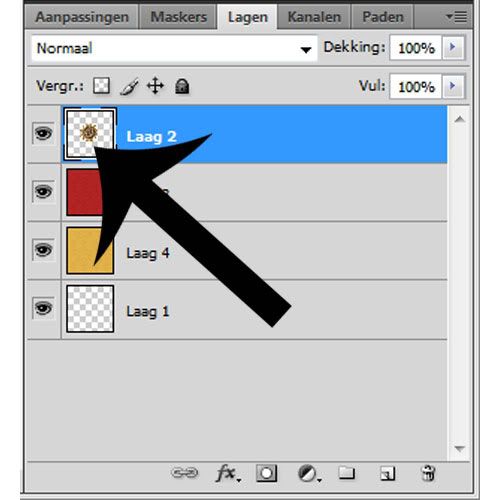
When you got the marching ants, select the paper underneath (without ctrl + clicking) and then hit delete. Next you can click on the eye (in front of the tumbnail) of the element to hide it, so that you can see if it worked.
Please let me now if it worked!