Thread: Text Along Path
View Single Post
Old 09-15-2010, 06:51 AM   #16
roxana
Checking out, and taking Magical Express back to MCO
 
roxana's Avatar
 
Join Date: Feb 2010
Location: Lima, Peru
Software: CS5
Camera: Canon
Posts: 8,246
Points: 21,798
Well, most of the time when using a template you already have the shape, so you just need the text, so in step 3 i choose shape tool, then on top left of the bar choose the middle image, the one with the pen, then I make my shape and just write along or inside the shape, i don´t go to paths. When you are done you can resize or rotate, whatever you need.
There is another tutorial of text in a shape ( creating your own shape eg a mickey mouse head) it´s by Laurie Scraps, I started that thread and she very kindly explained it to me and then put the tut on her forum and her blog, it might be interesting for you. Here´s the page I did with that tut:
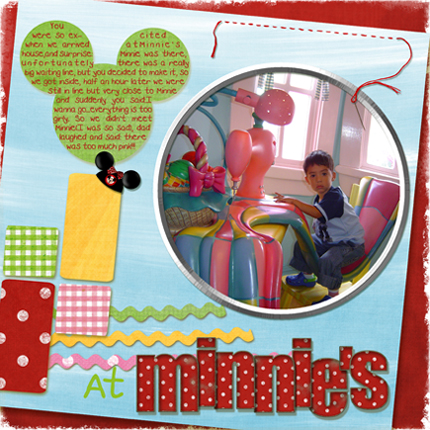

Here is the thread, from there you can go to her forum or to blog:
http://mousescrappers.com/forums/showthread.php?t=4656
__________________

I link to MouseScrappers! Mouse Ears Minnie\'s Bow Speed Scrapper! Sorcerer\'s Hat Jungle Cruise Peru Monorail Maracas Carousel horse Pirate Ears Teacups Pop Century Star Tours Captain EO Magical Express Thanks for being so helpful to others Roxana! Mickey\'s shorts Mickeys shoe Pirate Flag Viking Ship Pirate Dog Halloween 2010 - Limited Edition Cheshire Cat 1 Minnie\'s Shoe It\'s a Small World Thanks for hosting Mickey Bar Expedition Everest Mickey\'s glove Wish VoluntEAR - Castle

roxana is offline   Reply With Quote